

Development
HomeGallery is written in Javascript/Typescript and the source code is structured in a mono repro. To develop and change HomeGallery you need NodeJS, git and an IDE. VS Code is a good IDE.
Visit Internals and the FAQ to get familiar with the basic architecture and design decisions if you plan to develop or fix a feature. Visit Plugin section to get into the development.
You are invited to improve the documentation, the feature set or the code.
If you like to extend quickly some functionality, please visit Plugin section and check if your request can be handled through a lightweight plugin.
Overview
HomeGallery is a set of command line (CLI) tools. Each CLI command has its own purpose and each command can be built and developed separatly.
For example the [server] command starts the web server and spawns the [import] process to read and update media files. The [import] process consists of further CLI calls to update the file index, extract meta files and the database creation. The extractor uses the api server for ML or AI features.
Depending on your goal you need to update one or several modules.
Since the modules can be developed independendly the state and code standard vary based on the coder experience and their mood. Some modules have unit tests, some have e2e integration tests.
As output there are the binaries for different platforms and docker images. Via caxa simple binarys are bundled for for Linux, Mac and Windows. Docker and the binary are packaged by the [bundle] module.
Modules
The main module dependencies looks like
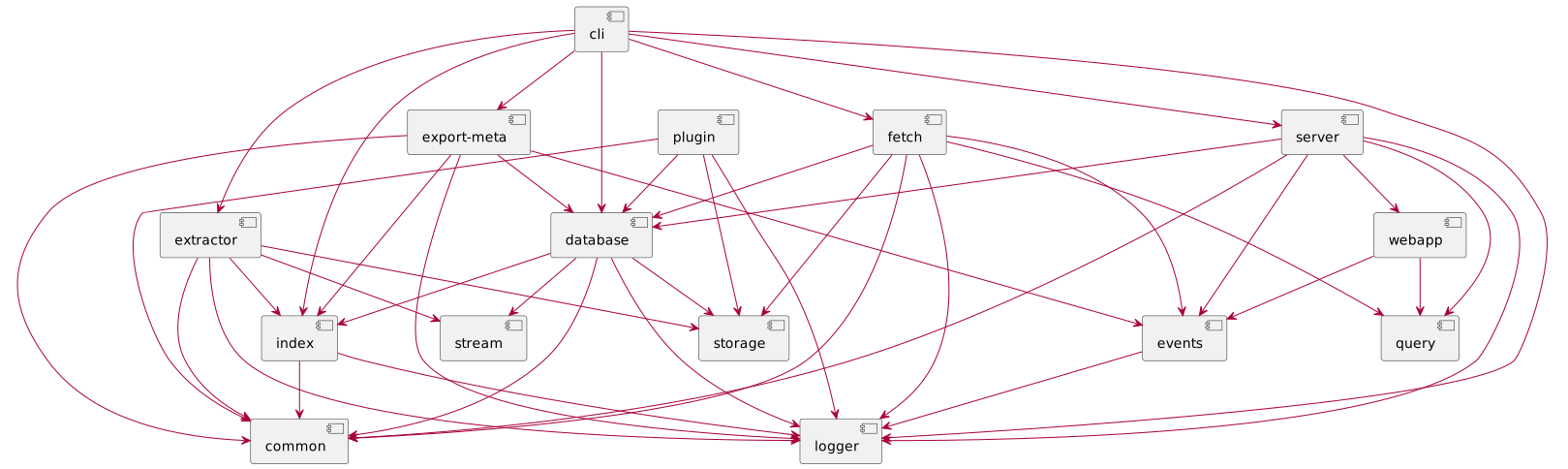
- cli provides the main entry point
- index implements the file index
- extractor implements the different meta file extractor and preview generation
- database creates and updates the database file
- server handles the backend web server
- webapp holds the frontend code
- events handles the logic for user events
- fetch pulls a remote gallery to a local gallery
Following utilities modules share some common logic
- storage deals with logic regarding read storage files and caches
- query implements the search parser and logic
- logger handles logging stuff
- common holds common logic for all modules like read and write compressed json files
Other modules are
- api-server implements the AI/ML features using Tensorflow JS
- export-meta exports user tags as XMP sidecar file
- export-static exports a subset of the gallery as static gallery
- bundle creates tar balls with binary dependencies for different OSs
- cast implements a casting feature for oogle Chromecast
Currently the code has no common format or style.
Setup
A basic setup is to clone the repo with test data repo, install the dependencies, build the code and run the tests.
Some modules have a [dev] or a [watch] npm
script which watches for changes and rebuilding the code on file
changes. Please check their scripts in package.json for details.
To run the e2e tests, you need to have ImageMagic and vips-tools installed to test native extractor settings.
Development
Depending on your goal you can fix a bug or add a feature to the backend or the frontend.
Backend
Usually you change something in one module.
For example to change something in the database you change to the appropriate module's directory and changes the source below the [src] folder. Than you build the sources and test your changes.
A bugfix or new feature in the backend should have a unit or an e2e test.
To debug you start the cli in the inspection mode and start the debugger in visual studio code by short cut F5.
Frontend
The major building blocks of the front are react, esbuild and tailwind css.
To develop something in the frontend you should run your server locally
via ./gallery.js run server and run the develop script in the
[packages/webapp] module.
To debug use the browser debugger.
For the frontend there are not test at the moment.
Unit Tests
For unit tests TAP is used. Some modules provide tests for some complex business logic.
Integration E2E Tests
For integration tests Gauge is used. It tests common cli calls and different scenarios. The e2e scenarios can be inspected in the e2e folder like here.
The e2e output logs are written to /tmp/gallery-e2e. Each run is filed
in a dedicated directory. /tmp/gallery-e2e/latest holds a symbolic
link to the latest e2e run. Each test scenario is filed in a separate
directory.
Within a single output folder the cli.log keeps the log of the cli
calls. While the e2e.log holds the console output of the cli calls.
With the tool jq you can inspect these
files.
Specific tests can be run via tags like
npm run test:e2e -- --tags extractor.
Documentation
This documentation is build via the repo
xemle/home-gallery-doc.
Please read its README.md for further instructions.
Your fix and improvements are welcome as PR on github.